



Oracle Fusion Cloud 19D – Supplier Creation
Roles
required:
required:
In Ebs, if
you have AP Responsibility then you can create Supplier easily but in Fusion
you must have following roles and functionality to create Supplier
you have AP Responsibility then you can create Supplier easily but in Fusion
you must have following roles and functionality to create Supplier
- Supplier
Manager - Supplier
Administrator - Procurement Agent
Step 1
Procurement > Supplier

Step 2
Create Supplier
Provide supplier name
business Relationship = “Spend Authorization” mean from this supplier, enterprise will procure and make payment as well.
Click Create


Step 3
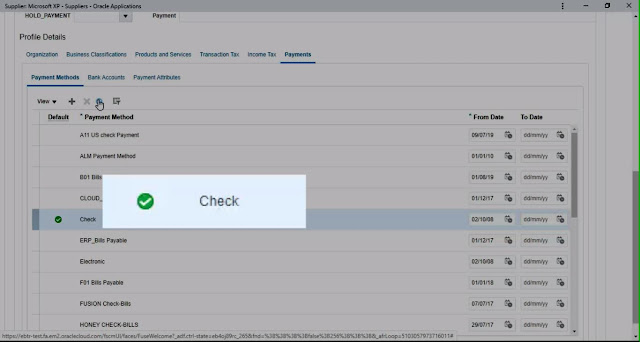
Set Payment Method
Payment Set Default as”Check”


Step 4
Create Address
In Fusion Supplier address and site Create Separately.
we have to give Address Purpose ordering (Purchasing) & Remit to (Payment)or RFQ Only.


Step 5
Create Site
in tab “site” by clicking Add sign we can create new Site


Provide Site name and site purpose Order or Pay or Procurement card or Sourcing

Step 6
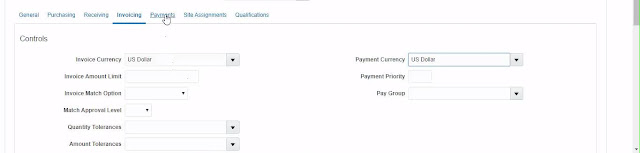
Create Site Invoice Currency
First click save then following option will be enable for update
Set the invoice currency and payment currency

Step 7
Create Site Payment Method
Set the Payment method at site level (this can be differ from Supplier main payment method)

Step 8
Create Site Assignment
Site Assignment is compulsory without assignment Supplier will not appear in Purchase order and at invoice creation
in Site Assignment you will provide BU Name (client & Bill to BU).

 |
Step 9
Save & close
after save and close Supplier Create Successfully